Feedback right now
Scan → Share feedback → Optional Google review
Ideal when customers are ready to share before they leave.HOW REVIEWDOCTOR WORKS
Make it easy for customers to share. Make it easier for your team to listen, follow up, and keep them coming back.
CHOOSE WHAT FITS YOUR BUSINESS
Two clear starting points. One place to manage the feedback.
Scan → Share feedback → Optional Google review
Ideal when customers are ready to share before they leave.Check in → Opt in → Complete visit → Invitation
Ideal when you want to give customers time after their visit.THE CUSTOMER JOURNEY
Here’s what happens, one step at a time.
A customer scans your sign with their phone. Your business’s feedback page opens right away—no app download or customer account needed.
Customers tell you how their visit went. They can send private feedback to your team or choose to leave a Google review, whatever their experience.
Prefer to ask after the visit? Use a check-in QR sign. Customers enter their details and choose whether to receive a feedback invitation. Your team completes the visit, then your chosen timer starts.
Keep feedback in your business workspace, see what needs attention, and follow through. Connect your Google Business Profile to manage reviews and enable automatic replies when configured.
MORE THAN A REVIEW LINK
Connect the tools that fit your business. Keep customer choice and your team’s control at the center.
VISIT MANAGEMENT
Search a dated visitor logbook, filter visits, export loaded records, and let authorized staff complete visits.
Explore visit managementCUSTOMER MESSAGING
Edit custom SMS campaigns, preview your opted-in audience, and schedule messages. Marketing permission stays separate from feedback consent.
Explore customer messagingAFTER-VISIT WORKFLOWS
Arrange a check-out trigger, permission check, delay, invitation, and optional no-response reminder. Simulate before activation.
Explore after-visit workflowsCONNECTED SCREENS
Upload ads, pair supported players, assign separate playlists, and schedule playback. Add live waiting-area layouts without a crowded dashboard.
Explore connected screensDESIGNED FOR YOUR WAITING AREA
Choose from five live templates with an aggregate active check-in count, local date and time, and supported US weather forecasts. Check-out updates the count on the next refresh.
Explore waiting-area templatesActive check-ins are not a queue position or wait-time estimate. No visitor names appear on these banners.
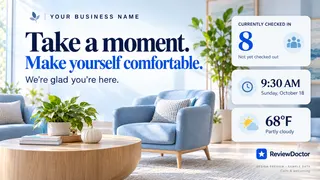
Turn loyalty on when it fits your business. Customers join through a dedicated QR code, enter their name, phone, and email, and earn progress toward rewards you set.
Rewards are for loyalty activity and are independent of feedback or Google reviews.
FOR BUSINESS OWNERS
Add your business and its Google review link.
Set up immediate feedback, check-ins, or both. Configure consented follow-ups in Business Settings.
Create a station, download your sign, and test the customer experience before displaying it.
A FEW QUICK ANSWERS
No. A phone camera opens the QR page in their browser. Customers do not need a ReviewDoctor account to share feedback.
Yes. Customers can choose private feedback or open your Google review link, regardless of whether their experience was positive or negative.
You choose a delay in Business Settings. The timer can start at check-in or when staff completes the visit. Due invitations are processed hourly, so delivery may occur after the configured delay.
SMS follow-ups require business registration, provider approval, and customer consent. Phone rental and messaging charges apply separately. Email follow-ups can be configured as another channel.
No. Loyalty has its own dashboard tab and can be turned on or off for your business. Rewards are separate from reviews.
SEE IT FROM YOUR CUSTOMER’S SIDE
Explore the demo, then create a flow that fits your business.